Environmental Survey Data Format
Introduction
This document shall be distributed to VENDOR involved in the survey activities.
Visual Survey of Corals
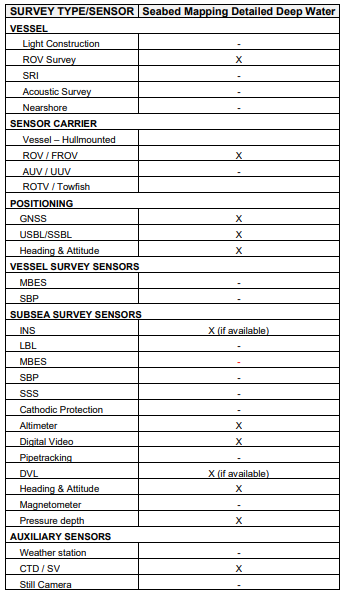
Selected targets shall be inspected with a full ROV video survey and classified in accordance with “Supporting guideline for coral survey Rev8_23082018”.
The above Equinor Guideline is based on the DNV guideline “Monitoring of drilling activities - Areas with Cold Water Corals”
This document provided guidelines and examples references to specific cold-water coral types made.
It is important that all coral video surveys are performed slowly with enough light, so the corals can be assessed later by marine biologists. A complete perimeter survey shall be conducted of all corals found. At least one still camera image shall be produced for each coral giving a view of the full coral. Reference is made to “Supporting guideline for coral survey Rev8_23082018”
What to look for in a visual survey.
Coral Reefs
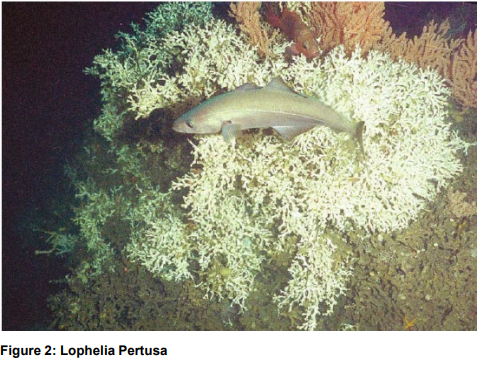
The coral reefs create “biodiversity hotspots”. Lophelia Pertusa is the reef building coral. A reef will consist of a front of living Lophelia facing the sea current. Downstream the reef front there will be dying or dead Lophelia. At the tail of the reef a ridge of coral gravel/rubble will typically be present.
Coral Gardens
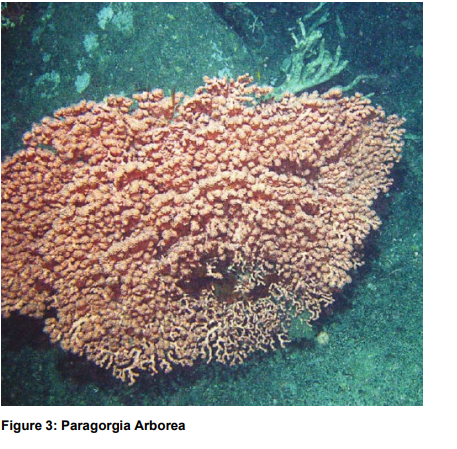
− Defined by OSPAR as «relatively dense aggregation of colonies or individuals of one or more soft coral species covering an area of at least 25 m2» − Paragorgia Arborea is the most common soft coral. Do not form hard skeleton. Are dependent on hard bottom, often coral gravel formed by dead Lophelia. − Primnoa Resedaeformis is also common on coral reefs in the Norwegian Sea
Survey Sensors
Data Model
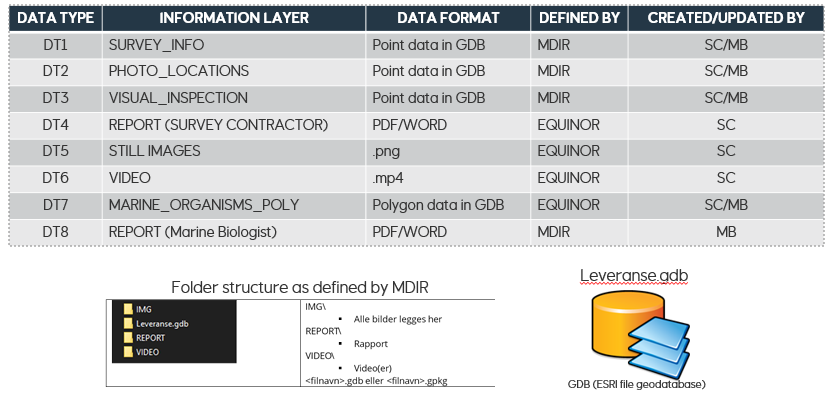
This data model consists of eight datatypes, and four of these are GIS layers.
DT1-DT3 shall be delivered in a geodatabase format, according to MDIR specifications:
• Survey info – Metadata of the areas where visual surveys have been carried out (DT1). This is initially populated by the survey vendor (SC).
• Photo location – Georeferenced photos that have been taken during visual surveys (DT2). This is initially populated by SC, but if Marine Biologist (MB) sees the need to add more images (i.e. video grabs), MB should update DT2 accordingly.
• Visual inspection – Biological observations recorded according to MDIR specifications.
In addition, Equinor requires a polygon datatype (DT7). This shall be delivered in the geodatabase format defined below in the “MARINE ORGANISMS – CORALS (POLYGON)” section.
Reporting
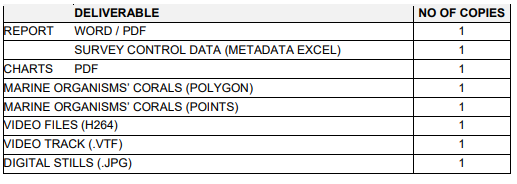
The Equinor SurveyID is used as the unique tracking identifier in all project and data management operations. Hence, it is of high importance that all relevant documentation, logs, labels and written communication related to the project shall have the Project Identifier as part of the title/subject field.
General Requirements for video
Video shall be overlaid with the following information: Date, Time, Easting, Northing, Heading, Depth, Altitude SurveyID, location ID, Pitch, Roll, Speed over ground (m/s)
No company or other logos shall be used (overlay)
Video format (H264)
Video shall be delivered in H264 (MPEG-4 AVC) coding format with 720p resolution. Vendor shall select frame rate and shutter speed to ensure good video quality in “play” mode as well as in “paused” mode (not blurry).
The “moov atom” shall be at the beginning of the file. The moov atom is like a global "index table" of the MPEG-4 file.
This option may be named “Web optimized” or “fast start”.
The physical name of the video files (.mp4) is build up as follows:
<SurveyID >_<Date and Time ( YYYYMMDDHHMMSSsss)>_<Camera_Name>.mp4
i.e. EQ20638_20200319210458231@CAM2.mp4
Video Track Format (.VTF)
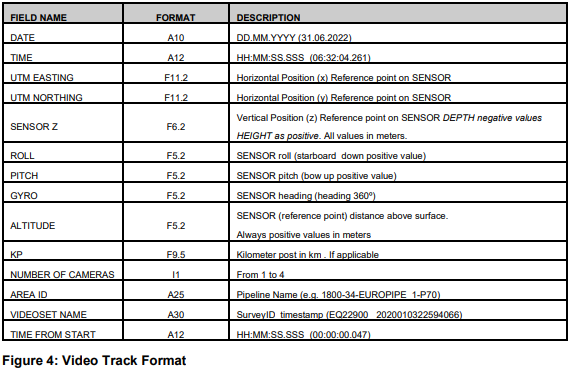
Video track data shall be delivered as ASCII comma separated files. Comma (,) shall be used as field separator and point (.) as decimal separator. There shall be one record for each second. The first record shall consist of the field names as given in table There shall be a one-to-one relationship between video sets and video track files. Video sets is a collection of one to 4 video files (cameras) covering the same time range within a survey
Filenames shall consist of <Video set name>.vtf and to be placed together with the corresponding video
set files.
The following camera code in the video file names shall be used:
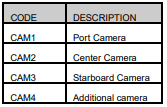
Example of video set with corresponding files (3 cameras): EQ22900_20220603225940232@CAM1.mp4 EQ22900_20220603225940232@CAM2.mp4 EQ22900_20220603225940232@CAM3.mp4
If only one camera is in use this shall be named CAM2 (centre camera)
MARINE ORGANISMS’ CORALS (POLYGON) (DT7)
Results from interpretation of acoustic data shall be delivered as polygon GIS files containing one polygon area for each feature (coral area).
Care should be taken to track the outline of the reef base as accurately as possible. The criteria for selecting targets should be described in the report.
It is important that every coral reef structure is given a unique ID (Attribute = LOCALITY) referred to in the resulting coral map. The DATA_URL attribute shall hold the reference access to the video sequences and still photos of a specific coral reef spotted on the coral map shall be available. The naming convention for the LOCALITY unique ID shall be EQyypnn_001 (sequential increase) Each feature (row in the attribute table) shall contain all relevant attributes (results)
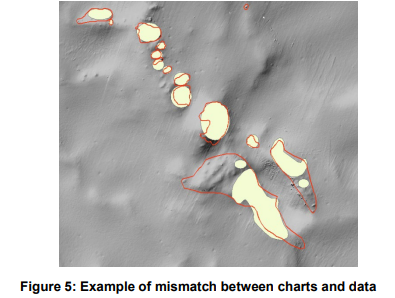
There shall be consistency in the coral areas (outlines) on charts and the coral areas in the shape file. Use multishape polygons, do not use fixed shape like ellipses.
MARINE ORGANISMS’ CORALS (POLYGON AND POINT) ATTRIBUTES
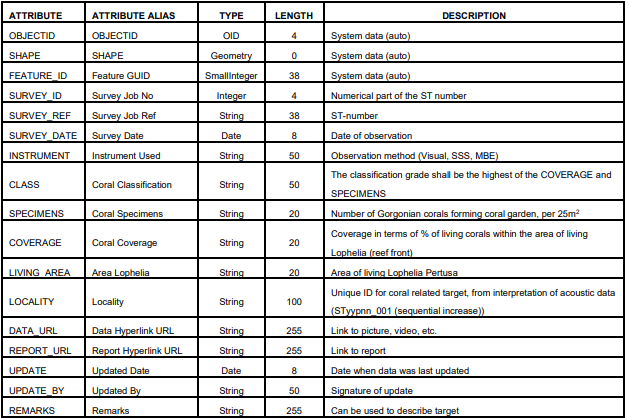
Coral targets, not inspected:
In the case of an interpreted reef structure which is not to be inspected (i.e., because it is outside of the defined area for visual inspection), the outline of the structure shall be reported as a polygon shape file.

Note: All cells in column REMARKS should be filled out. To be aligned with the terms used in the Equinor GIS database, only the categories ‘’Interpreted coral reef or garden’’ for outlines with high degree of confidence and ‘’ Possible coral reef or garden’’ for others should be used
Coral targets, inspected.
Inspected targets shall be reported so that as each coral area represents one feature (row in the attribute table) which shall contain all relevant attributes (results):

Note: If no reef/coral garden exist, or in the case of a single coral on a rock, the classification shall be "No reef/coral garden"
Seabed Features
Other observations not interpreted to be related to corals shall be reported and described as per TR1063 (separately from the coral features).
MARINE ORGANISMS’ CORALS (POINT)
Each still image shall be delivered as a point GIS class feature. The point feature shall include the same attributes as the polygon feature
Methane Sensor Type LMS (pump and detector)
Logged data shall be delivered in comma separated files. Comma (,) shall be used as field separator and point (.) as decimal separator. The first line in the file shall state data type (see example below)
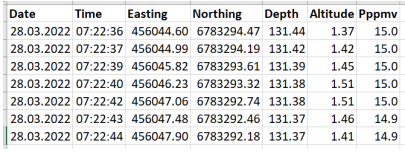
If the data covers and area data shall be delivered in a georeferenced raster image format where each pixel value represents the measured data (see example below).
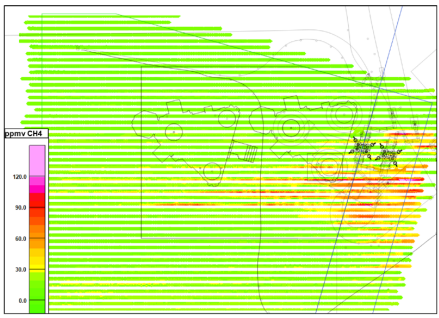
File Naming convention:
Single line data:
<SurveyID>_”Methane_LMS”_<Line name>_<startkp>_<endkp>_<yyyymmdd>_<other ref>
Other
<SurveyID>_” Methane_LMS”_<Project-name (shortname)>_<yyyymmdd>_<other ref>_<Line id>
Where: A = Acoustic, LMS = Sniffer (Laser), S = Sniffer (other)